Ads
Another great way to monetize your game is by displaying advertisements. Below is the setup guide for our currently supported ads system: AdMob.
AdMob Overview
AdMob is a popular Google product designed specifically for mobile game and app monetization.
1. Linking Your App ID
To begin, you need to bind your game to your Google AdMob account.
- In Unity, go to the top menu and click
Assets > Google Mobile Ads > Settings.
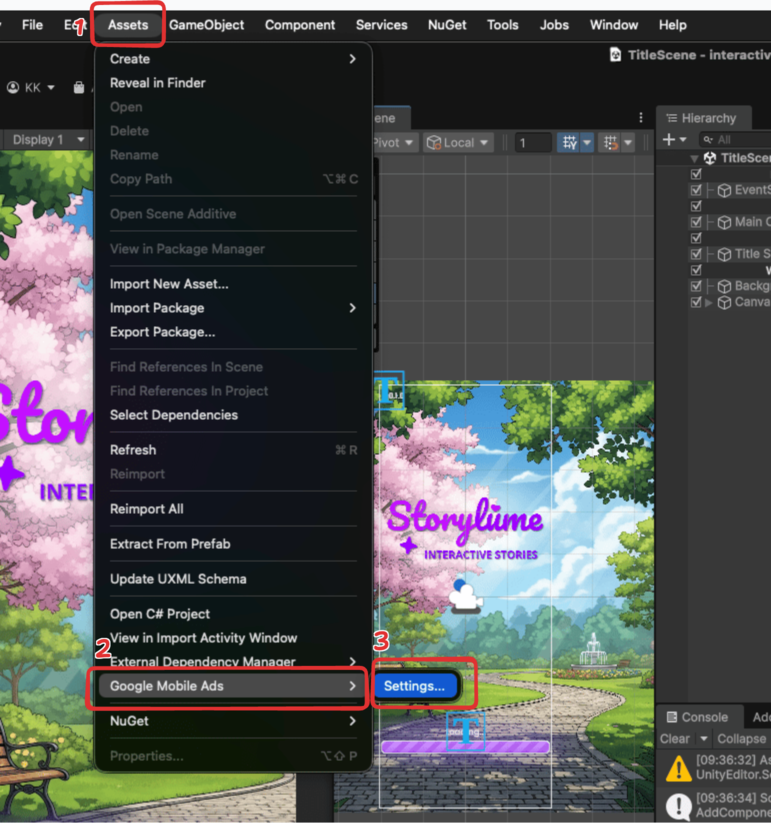
- This will open the AdMob settings inside your Inspector window.
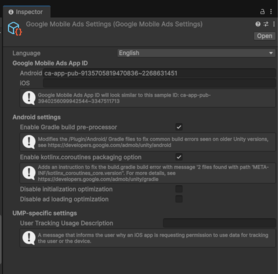
Google Mobile Ads App ID Inside these settings, the most crucial step is to paste your Google Mobile Ads App ID. This establishes the connection between your game and your Google AdMob account, ensuring you can track data and get credited for the ads shown!
2. Setting Up Ad Units
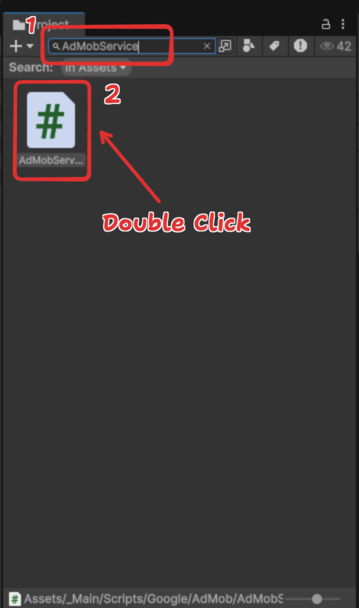
Once the game is linked to your account, you need to specify the exact ads you want to show using the AdMobService.cs script.
- In your Project window, search for and open
AdMobService.cs.
- Inside the script, scroll down until you find the
#if UNITY_ANDROIDsection.
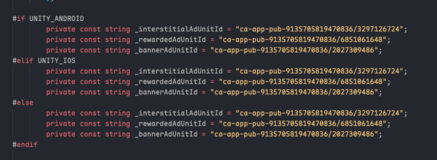
Ad Unit Setup Variables
Assigns the specific IDs to control which ads are displayed for each device platform.
Syntax:
#if [PlatformMacro]
    private const string _interstitialAdUnitId = "[AdUnitID]";
    private const string _rewardedAdUnitId = "[AdUnitID]";
    private const string _bannerAdUnitId = "[AdUnitID]";
Parameters:
| Parameter | Type | Options | Description |
|---|---|---|---|
| PlatformMacro | code | UNITY_ANDROID, UNITY_IOS | The device platform you are targeting. (Use #else for other platforms like Fire OS or Huawei). |
| _interstitialAdUnitId | text | AdMob ID string | The unique ID for full-screen ads. |
| _rewardedAdUnitId | text | AdMob ID string | The unique ID for ads that give players a reward for watching. |
| _bannerAdUnitId | text | AdMob ID string | The unique ID for small, continuous banner ads. |
Examples:
#if UNITY_ANDROID
    private const string _interstitialAdUnitId = "ca-app-pub-xxxxxxxxxxxxxxxx/xxxxxxxxxx";
    private const string _rewardedAdUnitId = "ca-app-pub-xxxxxxxxxxxxxxxx/xxxxxxxxxx";
    private const string _bannerAdUnitId = "ca-app-pub-xxxxxxxxxxxxxxxx/xxxxxxxxxx";
#elif UNITY_IOS
    // Insert your unique iOS Ad Unit IDs here
#else
    // Insert IDs for other platforms (Fire OS, Huawei, etc.) here
#endif
Assigns the specific AdMob IDs for Android devices, while providing a dedicated space for Apple devices (iOS) and alternative platforms.
Once everything is fully set up, your game is ready to display ads! The game will now automatically send data back to your AdMob account, allowing you to track exactly how many users are viewing ads inside your build.